
Machines Simulator Suite
Educational Tool for Automation Training

Teach Industrial Automation from Practice
Machines Simulator Suite is an all-in-one toolkit designed to teach industrial automation in a practical, safe, and accessible way. It enables the simulation of machines, processes, and control systems without the need for physical hardware, bringing a realistic environment to the classroom where students can design, program, and test industrial solutions.
The suite bridges the gap between theory and practice, providing a space where students interact with digital models that accurately replicate the behavior of real machines. This makes teaching automation, mechatronics, and control more intuitive, engaging, and efficient.

Why Educational Centers Choose Machines Simulator
100% Safe environment
Eliminate workplace risks. Students can make critical mistakes and learn from them without physical danger or expensive damage to equipment.
One student, one machine
No more students waiting on the sidelines. Ensure a 1:1 ratio where every student has their own workstation and practices 100% of the time.
VR & AR Immersion
Boost student engagement. With our VR and AR modules, students can visualize and virtually “step inside” the Digital Twin they are programming.
Troubleshooting training
Go beyond programming. Use the Fault Injection System to fake signal errors and breakages, teaching students how to diagnose and fix real-world problems.
60+ Ready-to-Use scenes
It includes a library of over 60 pre-built industrial scenarios (palletizers, tanks, solar energy, elevators, automotive, logistics) covering various sectors.
Custom Digital Twins
Virtualize your physical workshop. The editor allows you to build exact replicas of your physical training rigs so students can practice on the “same” machine at home.
Limitless component library
Access over 600 3D models and 250 pre-programmed components. If it doesn’t exist, you can design your own mechanisms within the software without limits.
Realistic industrial physics
It’s not a video game; it’s a simulator. Collisions, gravity, pneumatics, and hydraulics behave realistically, forcing students to program with professional precision.
Server Manager: Total control
Teachers can manage the access, see who is connected, set specific passwords per station, and remotely release licenses if a student forgets to log out.
Flexible floating licenses
Install the software on as many PCs as you need. The license is not tied to a specific hardware; it “floats” and can be moved from one computer to another instantly.
Hybrid learning (home & class)
Break the classroom walls. No local school network required—students can install the software at home and log in via the internet to complete assignments.
Drivers: Universal connectivity
Use the hardware you already own. Connect to real PLCs (Siemens, Allen Bradley, etc.) or soft-PLCs using our wide range of included I/O communication drivers.
What is included in the Suite? The Complete Automation Ecosystem

Machines Simulator
Real-Time 3D environment industrial simulation
The core of the suite. A state-of-the-art 3D sandbox that enables the real-time simulation of industrial machines, processes, and Digital Twins. It features a built-in editor to design custom scenarios with realistic physics (gravity, collisions, rigid body dynamics), allowing students to visualize, test, and validate their control logic in a safe, virtual factory.


EasyPLC
PLC simulation software
A comprehensive—and optional—PLC software included in the suite. It is the perfect solution for those who want to learn automation logic but do not have licenses for expensive third-party industrial software. It allows students to program in standard languages (Ladder, Grafcet, Script, Instruction List and Function Block) without needing external tools.

Drivers
Connectivity bridge between PLCs and the simulation
Built directly into Machines Simulator, this extensive library of drivers connects the 3D virtual environment to the physical world. It ensures seamless communication with most physical and virtual PLCs brands (Siemens, Allen Bradley, Omron, Schneider…), industrial protocols (Modbus, OPC, TCP/IP…) and external I/O boards, turning any PC into a connected industrial station.

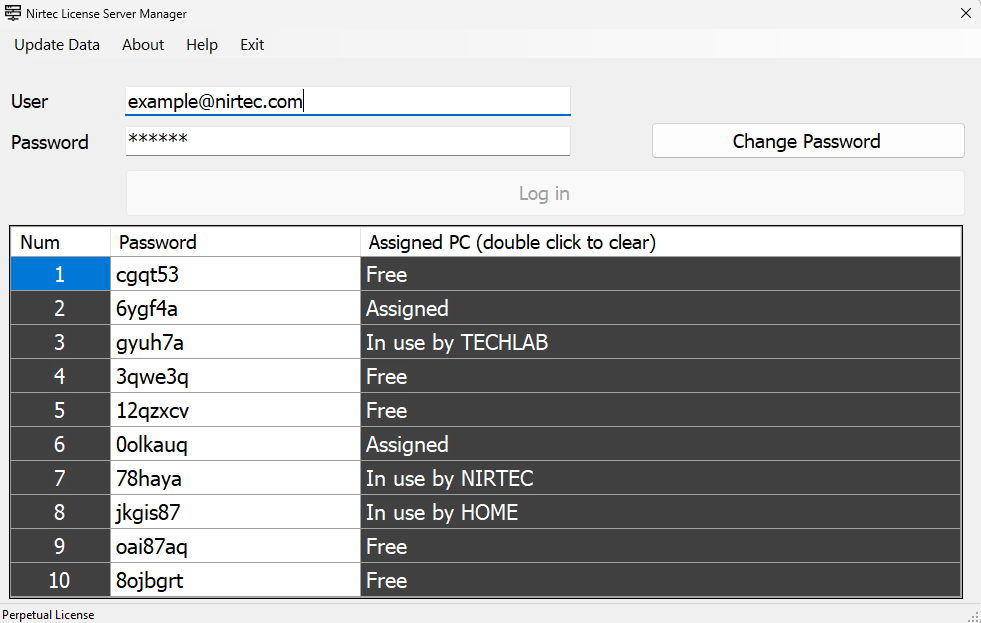
Server Licenses Manager
Centralized license control management
The administrative hub that allows the teacher to manage floating licenses, monitor active sessions, set password protections for specific stations, and remotely release licenses, ensuring smooth and controlled classroom management.
Chosen by Leading Training Centers and Universities






Community & Resources: You Will Never Teach Alone
Access a global network of shared content and specialized technical support.
To streamline your teaching experience, Machines Simulator Suite includes access to an ecosystem designed for continuous learning.
Nirtec asset store
Access a cloud-based repository where you can download machines, components, and PLC programs created by other instructors and experts worldwide.
Professional training
We offer tailored training courses for your faculty, covering everything from the basics of the software to the creation of custom Digital Twins.
Forum & academic support
Resolve technical and pedagogical questions directly with our developers and an active community of automation teachers.

Tutorial Manager
Access to 20 extra exercises with solutions or create custom ones. You can password-protect the answers, making it ideal for guided practice and secure evaluation.
FAQ – Frequently Asked Questions
What are the minimum hardware requirements for our classroom computers?
The Machines Simulator Suite works seamlessly with Windows 10 and Windows 11, and is also fully compatible with VMware Workstation (version 15 and higher). While EasyPLC runs on both 32-bit and 64-bit operating systems, Machines Simulator requires a 64-bit OS.
Recommended Specifications:
- Memory: 8GB of RAM recommended (4GB Minimum).
- Disk Space: 5GB of free space.
- Processor: Compatible with SSE2 instruction set.
- Graphics Card: DX9 support (Shader Model 3.0) or DX11 with feature level 9.3 capabilities.
How does the floating license system work? Can we install the software on all school computers even if we purchase fewer user seats?
The licensing system is straightforward. You simply log in with your username and password to activate the license. Once activated, the license registers the specific computer being used. Subsequent launches will log in automatically.
To move to another computer, you just need to log in and click “Deactivate” to unlink the license. Additionally, the administrator can remotely release any seats that are not currently in use directly from the Server License Manager.
Can students use the school license to practice from home (remote learning)?
Yes. Students only need their access credentials (username and password) and an active internet connection for the login process.
Is the simulator compatible with the physical PLCs we already have in the workshop (Siemens S7-1200, Allen Bradley, Omron, etc.)?
Yes, Machines Simulator features built-in communication drivers for both real and virtual PLCs. You can review the full list of compatible models and industrial protocols. (Learn more)
Is there an annual subscription or maintenance fee?
No. Aligned with our philosophy of democratizing access to high-quality industrial training tools, we offer perpetual licenses for educational institutions. This means it is a one-time purchase: there are no recurring annual fees, subscriptions, or mandatory maintenance costs.
What happens when a new version is released? Do we need to pay for the license again?
New releases are announced via our social media channels and forum. Inside Machines Simulator, the settings menu features a “Check for Updates” button that will notify you if a new version is available and allow you to download it directly. Once downloaded, simply install it. All updates within the same major version are included free of charge.
Do you offer a trial version or a pilot program for our department to evaluate the tool before purchasing?
We offer a specific one-month individual license at a significantly reduced price. This allows departments to fully test the software and all its features before committing to a larger purchase.
Do you offer training courses for teachers?
Yes. As part of our services, we offer training courses for instructors tailored to your specific needs. These range from installation and software basics to advanced topics like creating your own custom Digital Twins.